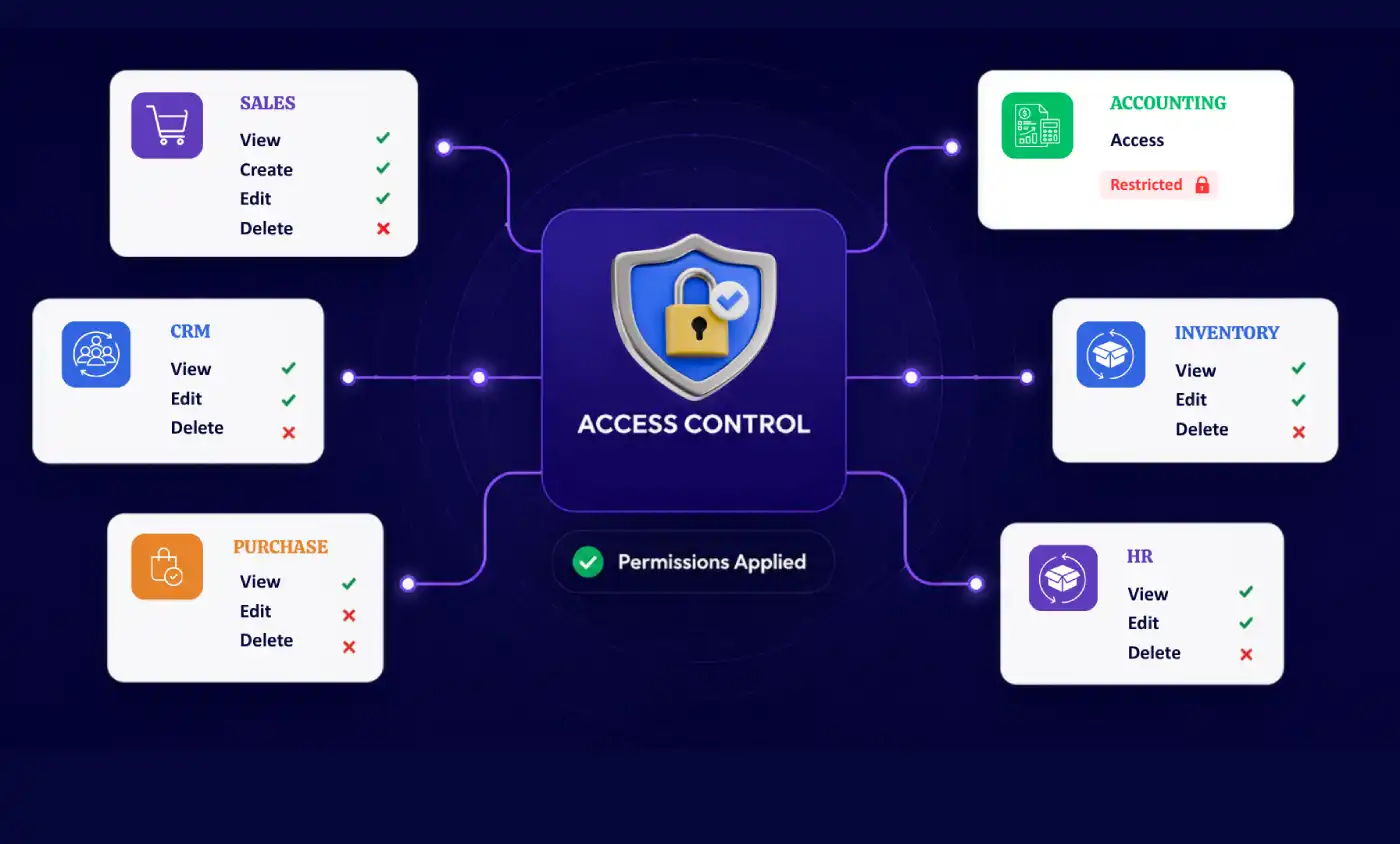
An access control layer built for how ERP teams actually work
Every growing ERP deployment hits the same wall: default user groups are too blunt. You can put someone in "Sales / User" or "Sales / Manager," but you can't stop that same user from seeing a competitor's margin field, exporting a customer list, or deleting a paid invoice without custom development.
The Access Management System closes that gap. It's a standalone access control system that sits on top of your Odoo environment and lets you restrict access at the exact level it matters: a single menu, a single field, a single button, a report, or even a chatter thread. Rules can be scoped to a user, a group, a company, or a time window, and they take effect immediately with no server restart, no code.
It's built for teams that have outgrown default permissions but don't want to maintain custom security code and it runs across Odoo Community, Enterprise, and Odoo.sh, versions 15 through 19.
Default permission groups are broad.
This system is precise
Default access groups are all-or-nothing at the model level. This system adds a fine-grained layer on top down to a single field or button, without a line of custom code.

Built for consistency
A lean, well-tested engine keeps access rules behaving consistently across every view type list, form, kanban, and pivot.

No performance tax
Rules apply at render time without adding noticeable load to page rendering, even on record-heavy views.

Lower maintenance overhead
Fewer moving parts than a custom-built access layer means fewer support tickets and less time spent maintaining permissions by hand.
Built for the access problems
real ERP teams run into
One precise control layer, shaped around the way different teams, locations, and responsibilities actually operate.

HR & Payroll
Hide salary, payslip, and contract fields from anyone outside HR, while keeping the rest of the Employees workspace visible to managers.

Multi-branch retail
Give each store manager access only to their own company's records with multi-company rules, without duplicating user accounts.

Implementation teams
Ship client-ready environments with locked-down menus and buttons that match each client's internal approval process.

Finance & accounting
Make ledger and invoice fields read-only for non-finance staff and hide export or delete buttons on sensitive financial records.

Contractors & temp staff
Grant time-boxed access that revokes itself automatically on a contract's end date no follow-up cleanup required.

Shift-based teams
Restrict logins and record access to a defined working schedule, respecting each user's own time zone.

Sales organizations
Hide margin, cost, and internal-note fields from junior reps while letting managers see the full picture.

Compliance-driven teams
Enforce least-privilege access across regulated data without maintaining a custom security build.
Eleven ways to shape
what a user sees
Every restriction can be scoped to a group, a specific user, a company, or a time window and combined freely for layered access control.

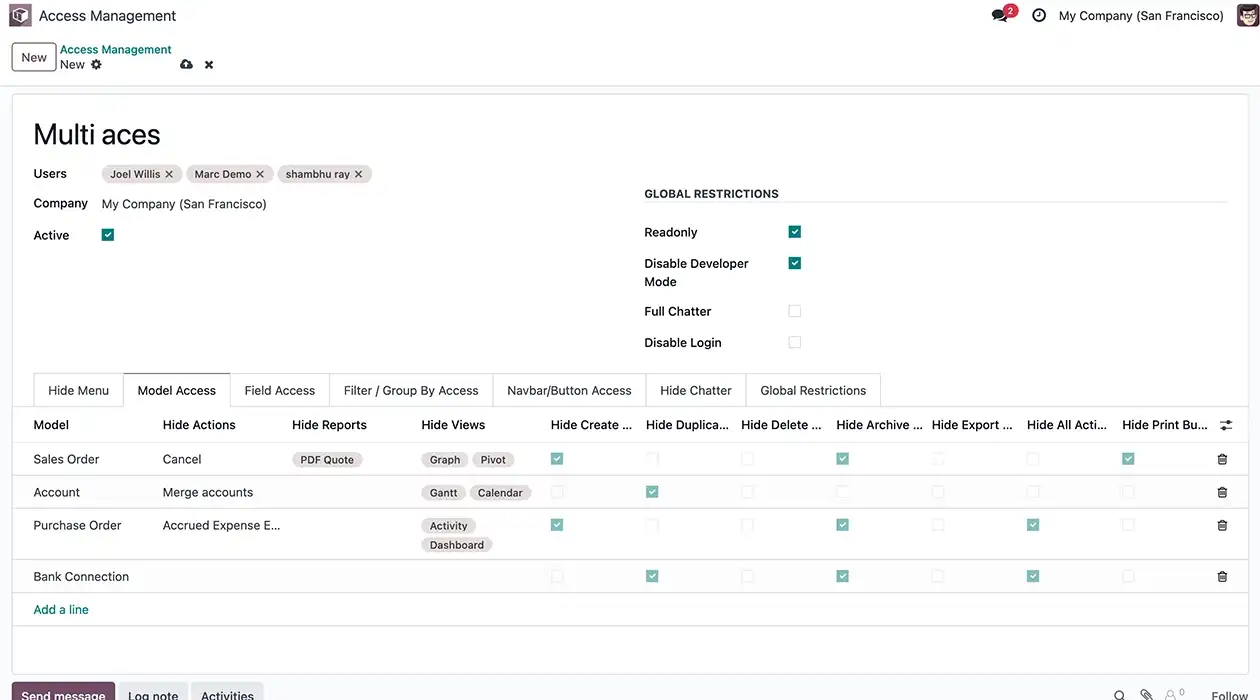
Model access rights
Control what a user can do on any record type, beyond default read/write/create/delete groups.
- Hide any action or report
- Hide any view
- Hide create / edit / delete
- Hide duplicate, export, import, print, spreadsheet

Menus & sub-menus
Remove entire workspaces or specific sub-menus from the navigation bar for users who don't need them.
- Hide any menu or sub-menu
- Hide an entire main app menu
- Hide any tab inside a form
- Hide kanban card links

Field-level security
The most requested capability: true field-level access control, applied to standard and custom fields alike.
- Hide any field
- Make a field read-only or required
- Restrict quick-create / quick-edit
- Remove external record links

Filters & group by
Simplify a view or hide sensitive groupings by controlling what appears in the search panel.
- Hide any filter or group-by option
- Hide the search panel
- Hide favourites

Button-level restrictions
Hide any individual button, on the navbar or inside a form, without touching the rest of the view.
- Hide any button on any view
- Applies to navbar and form buttons alike
- Hide Create, Edit, Delete, Duplicate buttons
- Restrict custom wizard & action buttons

Chatter, record-wise
Keep internal discussions private by restricting chatter per record type instead of hiding it everywhere.
- Hide the chatter on any record type
- Hide send message
- Hide log notes
- Hide the activity scheduler

Multi-company support
One login, different permissions per company, built for holding groups and multi-branch operations.
- Different access rules per company
- One user, different permissions per entity
- Scope restrictions by active company
- Seamless multi-branch compliance

Automatic access expiration
Set a rule once, and let it revoke itself, ideal for contractors, interns, and temporary vendor access.
- Auto-revoke access after a set date
- No manual follow-up cleanup needed
- Ideal for contractors & temporary vendors
- Set start and end validity periods

Time & time-zone rules
Restrict logins and record access to a working schedule, evaluated in each user's own time zone.
- Restrict access to a schedule
- Respects each user's own time zone
- Block off-hours logins automatically
- Working hours & days based restrictions
Twelve switches that
apply system-wide
Flip these once at the user level instead of repeating the same restriction across every record type.
- Read-only user (buttons, actions, chatter, filters)
- Disable user login
- Hide import
- Hide action button
- Hide whole chatter
- Hide filter, group by, custom filter & group by
- Disable developer mode
- Hide export
- Hide print button
- Hide "Add a Property"
- Hide send message / log note / activity
- Hide search panel & favourites
Live in three steps
Set up Odoo access controls in minutes. Deploy the system, configure user permissions, and apply access rules instantly, without restarting Odoo.

Deploy the system
Add it to your environment. It runs on Community, Enterprise, and Odoo.sh, across versions 15 through 19.

Enable Access Management
Open a user's settings and switch on "Access Management Manager" to bring up the permission rule builder.

Define the rule
Pick the element menu, field, button, chatter, report, choose who it applies to, and save. Changes apply instantly, no restart needed.
Access Management System vs default permissions
Where standard user groups stop, this system continues
| Capability | Access Management System | Default groups |
|---|---|---|
| Hide a whole workspace or menu | Yes | Yes |
| Hide a single field on a form | Yes, no code | Only via custom code |
| Hide a specific button | Yes, no code | Only via custom code |
| Restrict chatter per record type | Yes | No |
| Time / time-zone based access | Yes | No |
| Auto-expiring access | Yes | No |
| Different rules per company | Yes | Partial |
| Requires a developer to change | No | Usually |
Under the hood
Engineered for seamless integration, minimal footprint, and zero dependency overhead across modern Odoo environments.
Odoo 15, 16, 17, 18, 19
Community & Enterprise, On-Premise and Odoo.sh
Discuss, Invoicing, and Sales workspaces enabled

Access Management System
None required
English, German, Arabic, Spanish, French, Chinese
Included for the life of your license
One System. Every Access Rule You'll Need.
Frequently asked
Everything you need to know before getting started.
Still have questions? Contact usOdoo 15 through 19, on Community, Enterprise On-Premise, and Odoo.sh.
No, the system is built for self-hosted On-Premise and Odoo.sh deployments, not the odoo.com SaaS trial platform.
No. The system runs on a standard Odoo installation with no additional libraries.
Yes, updates for your version are included for life at no extra charge.
Yes. The system applies at the field's technical name, so custom fields can be hidden or made read-only the same way as standard fields.
Record-level visibility, like limiting an employee to their own attendance, contracts, or payslips depends on the underlying record rules. Combine the system's UI-level restrictions with those rules, or contact support for a scoped setup.
Yes. Multi-company support means the same user can have different access rules in each company they're a member of.
Yes, reach out to our team to scope a custom setup.